
Design and price channel letters
Type a word or drop in a logo, style it, and price the materials and LEDs off the real outline.
What this is for
The channel-letter designer reads the actual vector outline of your letters — not a rectangle around them — and works out return coil, backing, trim cap, face acrylic and LED module placement from it. You get a material estimate you can send to a quote.
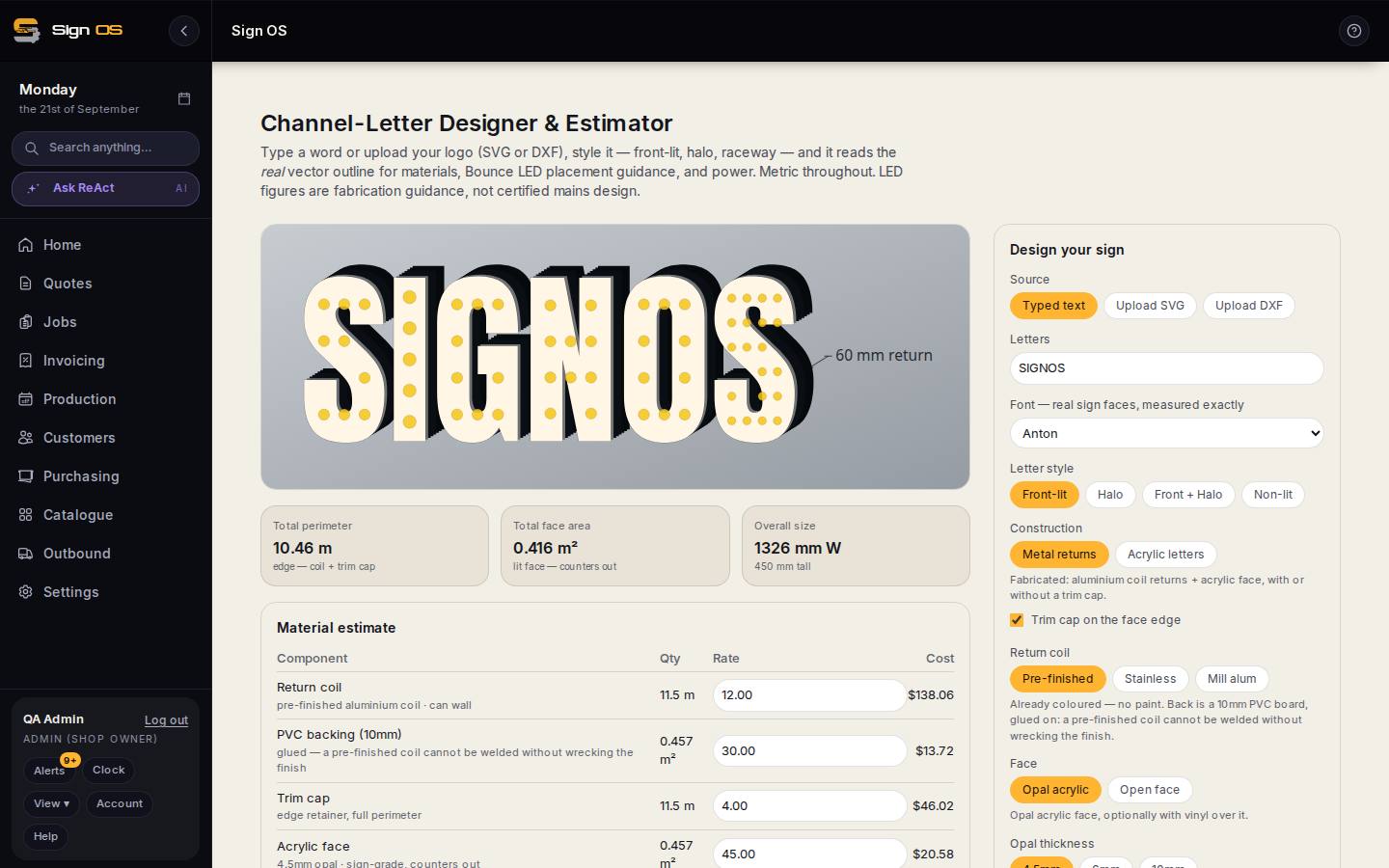
What is on this screen
Each part of the screen above, top to bottom, and what changing it affects.
- Type a word / upload SVG or DXF
- The lettering. The real vector outline is read for materials.
- Style · return depth · letter height
- Front-lit, halo or raceway; everything in millimetres.
- Total perimeter · Total face area · Overall size
- Edge (coil + trim cap), lit face with counters out, and the overall W × H.
- Material estimate
- Return coil by the metre, backing by area, trim cap by perimeter, acrylic face by area — component, quantity, rate and cost.
- Illumination
- Bounce LED module count, drivers and power — fabrication guidance, not certified mains design.
- Send to quote · Export DXF / STL
- Send fills the product's Channel letter layout calculator on a quote line; export is for the router.
Before you start
- Nothing. If you are pricing a logo rather than a word, have the SVG or DXF ready.
Step by step
- 1
Open Catalogue → Channel letters & LED layout.
- 2
Type the word, or upload your logo as SVG or DXF.
- 3
Style it — front-lit, halo-lit or raceway — and set the return depth and letter height. Everything is in millimetres.
- 4
Read the Material estimate: return coil by the metre, PVC or aluminium backing by area, trim cap by perimeter, and acrylic face by area with the counters taken out.
Note: The rates in that table are yours to edit. The geometry — perimeter, face area, overall size — is what Sign OS vouches for.
- 5
Check the Illumination panel for module count and power.
Note: LED figures are fabrication guidance for quoting and your bill of materials. They are not a certified mains design, and they do not replace an electrician.
- 6
Send it to a quote, or export DXF/STL for the router.
Tips & gotchas
- The reality-check line under the estimate compares your figure to a typical finished lit set. If you are well under it, you have probably missed the fabrication labour rather than the materials.
- Channel letters and LED layout are the same screen — /led-layout opens the same designer.
- A pre-finished coil cannot be welded without wrecking the finish, so the estimator glues the backing. That is deliberate, not an oversight.