
Units & conversions
Keep millimetres, metres and square metres adding up correctly.
What this is for
Sign OS converts between the units you buy in and the units you quote in — millimetres to square metres, rolls to lineal metres. Units and conversions are what make that maths correct behind the scenes.
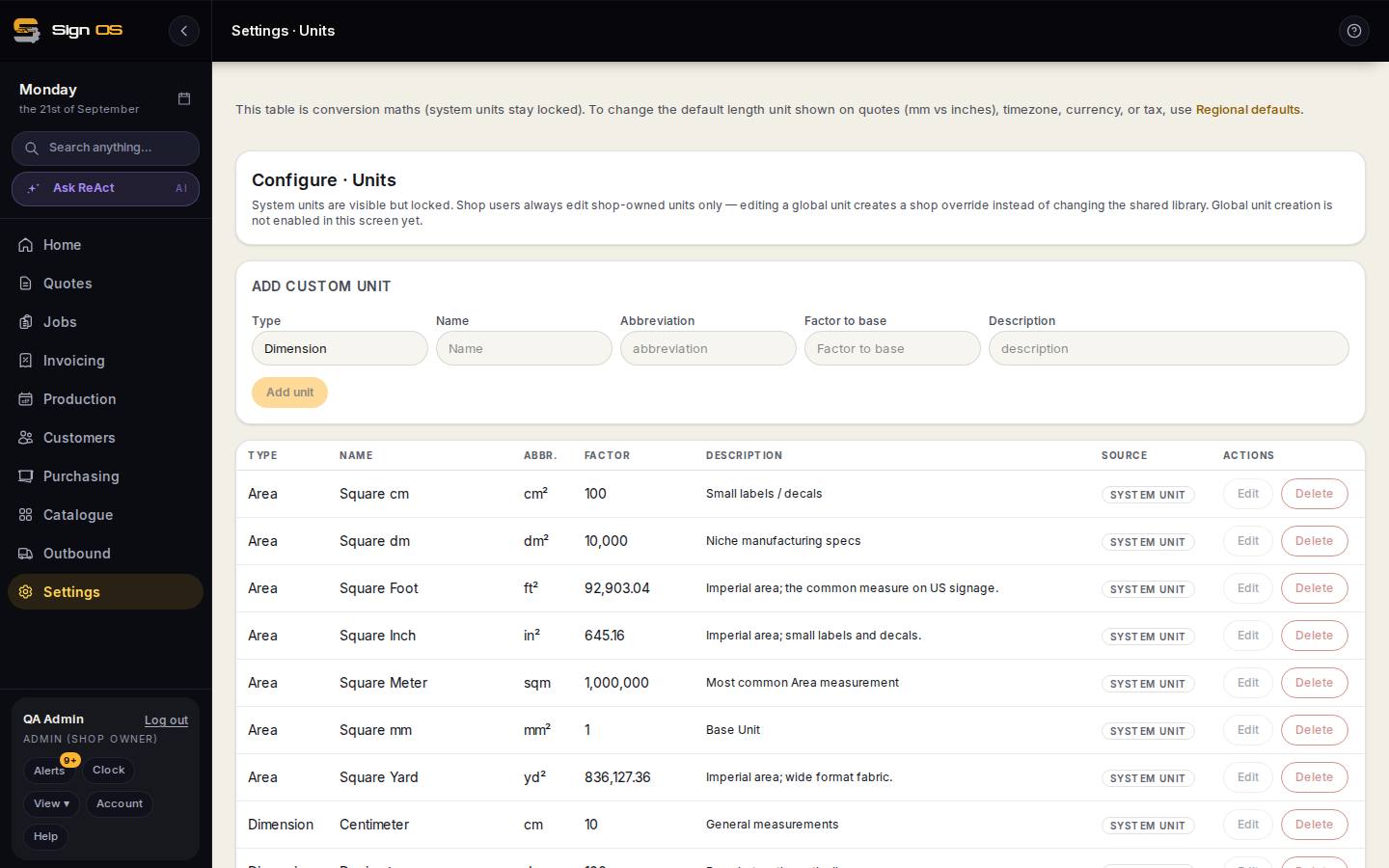
What is on this screen
Each part of the screen above, top to bottom, and what changing it affects.
- Units list
- Every unit Sign OS knows — sheet, roll, lineal metre, square metre, each, pack — and the conversions between them.
- Add unit
- A unit of your own, with how it converts to the base unit. A material bought in a unit with no conversion to its sell unit prices at nothing.
Before you start
- You are signed in as an admin.
Step by step
- 1
Open Catalogue → Units & conversions from the sidebar.
- 2
Review the units already set up and their Factor to base — that factor is how each unit converts.
- 3
Under Add custom unit, fill in the Type, Name, Abbreviation and Factor to base, then click Add unit if you work in a unit that is not covered. System units are locked.
- 4
Your recipes and quotes now convert sizes correctly.
Tips & gotchas
- Most shops never touch this after setup — it just works. Come here only if a size looks wrong in a quote.